Fitting a Line to Data

November 4, 2025

From Hypothesis Tests to Models

  • Last time:

    • Is there an effect? (null vs. alternative)
  • Today:

    • How does Y change with X?
    • Can we predict Y from X?

Why Build Models?

We use models to understand and predict relationships.

Example questions:

  • Does oil wealth impact regime type? (causal question)
  • Where is violence likely during an election? (prediction)
  • Is this email spam? (classification)

Each requires data and a model, but the goal (causal vs predictive vs categorical) determines how we evaluate it.

Model

  • A model is a simplified mathematical description of a relationship.

\[\widehat{y} = b_0 + b_1 x\]

  • \((b_1)\): change in \(( \widehat{y} )\) for a 1‑unit change in \((x)\)
  • \((b_0)\): predicted value when \((x=0)\)

A simple one-dimensional linear model.

Supervised Learning


  • We’re given data with
    • inputs: \(X\)
    • outputs: \(Y\)
  • We learn a mapping:

\[f:\; X \rightarrow Y\]

  • We use this to make a prediction of \(Y\) given \(X\).

Understanding Variables


  • Response (target, outcome, \(Y\)) — what we want to explain or predict
  • Explanatory (predictor, feature, \(X\)) — what we use to explain \(Y\)

Two common tasks


  • Regression: \(Y\) is continuous (e.g., income, temperature)
  • Classification: \(Y\) is categorical (e.g., f/m, fraud/not)
  • X can be numeric or categorical. If it’s categorical, R internally creates dummy variables for each category.

Today’s focus: linear regression with one predictor (a straight line).

Example Dataset: Palmer Penguins

library(tidyverse)
library(palmerpenguins)

# Keep rows with the two variables we need
model_data <- penguins |>
  filter(!is.na(flipper_length_mm), !is.na(body_mass_g)) |>
  select(species, flipper_length_mm, body_mass_g)

glimpse(model_data)
Rows: 342
Columns: 3
$ species           <fct> Adelie, Adelie, Adelie, Adelie, Adelie, Adelie, Adel…
$ flipper_length_mm <int> 181, 186, 195, 193, 190, 181, 195, 193, 190, 186, 18…
$ body_mass_g       <int> 3750, 3800, 3250, 3450, 3650, 3625, 4675, 3475, 4250…

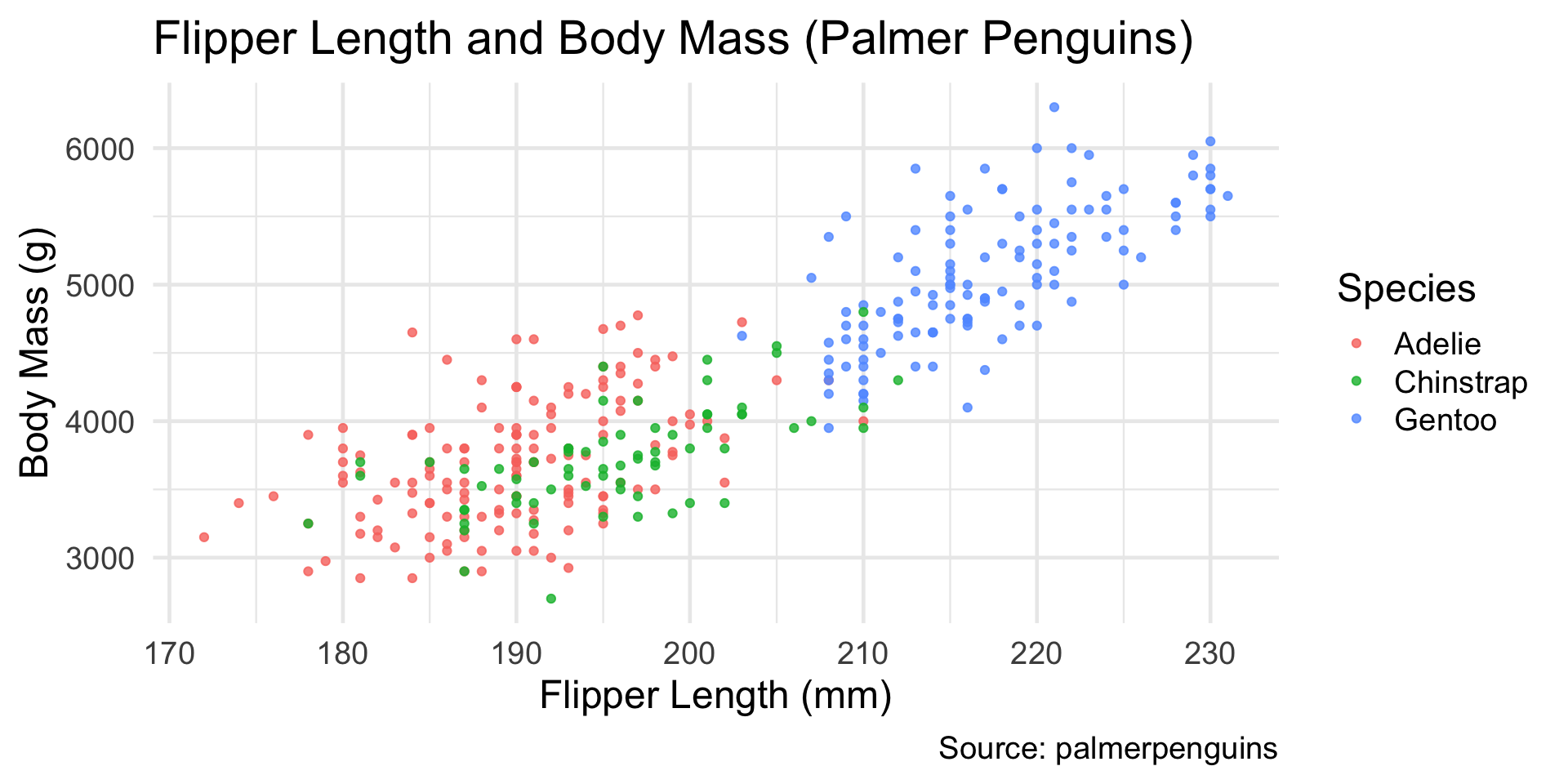
Visualizing a Relationship (Penguins)

Code
ggplot(model_data, aes(x = flipper_length_mm, y = body_mass_g, color = species)) +
  geom_point(alpha = 0.8) +
  labs(
    title = "Flipper Length and Body Mass (Palmer Penguins)",
    x = "Flipper Length (mm)",
    y = "Body Mass (g)",
    caption = "Source: palmerpenguins",
    color = "Species"
  ) +
  theme_minimal(base_size = 18)

We expect a positive linear association: longer flippers generally correspond to heavier penguins.

How Correlation Is Calculated

The Pearson correlation coefficient \(r\) measures the strength and direction of a linear relationship between two quantitative variables.

\[ \begin{aligned} r &= \frac{\text{cov}(x, y)}{\sigma_x \sigma_y} \\ &= \frac{ \sum_{i=1}^{n} (x_i - \bar{x})(y_i - \bar{y}) }{ \sqrt{ \sum_{i=1}^{n} (x_i - \bar{x})^2 } \sqrt{ \sum_{i=1}^{n} (y_i - \bar{y})^2 } } \end{aligned} \]

  • \(\sigma_x, \sigma_y\): standard deviations of each variable
  • \(\text{cov}(x, y)\): how \(x\) and \(y\) vary together

Correlation coefficients

Correlation coefficients range from -1 to +1:

  • r = +1: Perfect positive linear relationship
  • r = 0: No linear relationship
  • r = -1: Perfect negative linear relationship
  • |r| > 0.7: Strong linear relationship
  • 0.3 < |r| < 0.7: Moderate linear relationship
  • |r| < 0.3: Weak linear relationship

Correlation (Example)


base R function cor()

cor(model_data$flipper_length_mm, model_data$body_mass_g)
[1] 0.8712018


tidyverse cor()

model_data |>
  summarize(
    r = cor(flipper_length_mm, body_mass_g),
  )
# A tibble: 1 × 1
      r
  <dbl>
1 0.871

Try it out!


  1. Compute the correlation within each species. Which species shows the strongest linear association?

  2. How does this compare to the overall correlation?

  3. Try another set of variable like flipper_length_mm vs bill_length_mm.

05:00

Try it out!


model_data |>
  summarize(r = cor(flipper_length_mm, body_mass_g))
# A tibble: 1 × 1
      r
  <dbl>
1 0.871
model_data |>
  group_by(species) |>
  summarize(r = cor(flipper_length_mm, body_mass_g))
# A tibble: 3 × 2
  species       r
  <fct>     <dbl>
1 Adelie    0.468
2 Chinstrap 0.642
3 Gentoo    0.703

Try it out!

model_data2 <- penguins |>
  filter(!is.na(flipper_length_mm), !is.na(bill_length_mm)) |>
  select(species, flipper_length_mm, bill_length_mm)

model_data2 |>
  summarize(r = cor(flipper_length_mm, bill_length_mm))
# A tibble: 1 × 1
      r
  <dbl>
1 0.656
model_data2 |>
  group_by(species) |>
  summarize(r = cor(flipper_length_mm, bill_length_mm))
# A tibble: 3 × 2
  species       r
  <fct>     <dbl>
1 Adelie    0.326
2 Chinstrap 0.472
3 Gentoo    0.661

Finding the “Best Fit” Line

The goal of regression is to find the line that best predicts \(y\) from \(x\).

Each data point has a residual (error): \(e_i = y_i - \widehat{y}_i\)

The Mean Squared Error (MSE) is:

\[ \text{MSE} = \frac{1}{n} \sum_{i=1}^{n} (y_i - \widehat{y}_i)^2 \]

The best-fit line is the one that minimizes this MSE.
It makes the squared residuals as small as possible on average.

Fitting a Line Example

penguin_model <- lm(body_mass_g ~ flipper_length_mm, data = model_data)
summary(penguin_model)

Call:
lm(formula = body_mass_g ~ flipper_length_mm, data = model_data)

Residuals:
     Min       1Q   Median       3Q      Max 
-1058.80  -259.27   -26.88   247.33  1288.69 

Coefficients:
                   Estimate Std. Error t value Pr(>|t|)    
(Intercept)       -5780.831    305.815  -18.90   <2e-16 ***
flipper_length_mm    49.686      1.518   32.72   <2e-16 ***
---
Signif. codes:  0 '***' 0.001 '**' 0.01 '*' 0.05 '.' 0.1 ' ' 1

Residual standard error: 394.3 on 340 degrees of freedom
Multiple R-squared:  0.759, Adjusted R-squared:  0.7583 
F-statistic:  1071 on 1 and 340 DF,  p-value: < 2.2e-16

Model Interpretation

Our fitted model is:

\[ \widehat{\text{Body Mass}} = b_0 + b_1 \times \text{Flipper Length} \]

Example output (simplified):

\[ \widehat{\text{Body Mass}} = -5780 + 50 \times \text{Flipper Length (mm)} \]

Interpretation of coefficients:


  • Intercept (\(b_0 = -5780\)):
    The predicted body mass when flipper length = 0 mm.
    This is not meaningful for penguins (no penguin has a 0 mm flipper),
    but it’s mathematically required to define the line.

  • Slope (\(b_1 = 50\)):
    For each 1 mm increase in flipper length,
    the model predicts an average increase of about 50 g in body mass.

In context:


  • A penguin with a flipper that is 10 mm longer is predicted to weigh roughly 500 g more, on average.
  • Predictions are for average trends, not individual birds. Real data always has variability around the line.

Predictions and Residuals

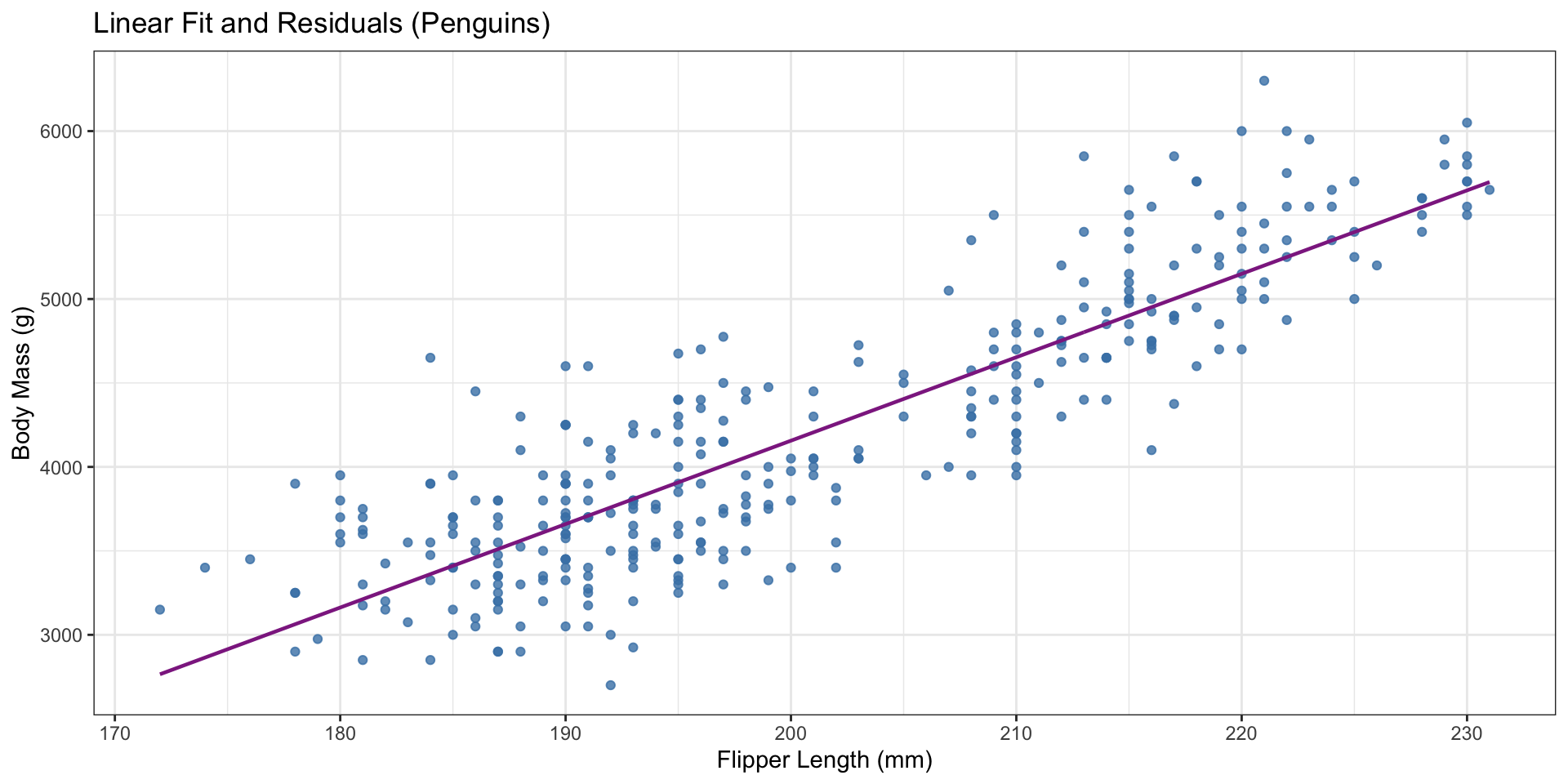
  • Predicted values: \(\widehat{y} = b_0 + b_1 x\)
  • Residuals: \(y - \widehat{y}\)

Penguins above the line have positive residuals (heavier than predicted); those below have negative residuals.

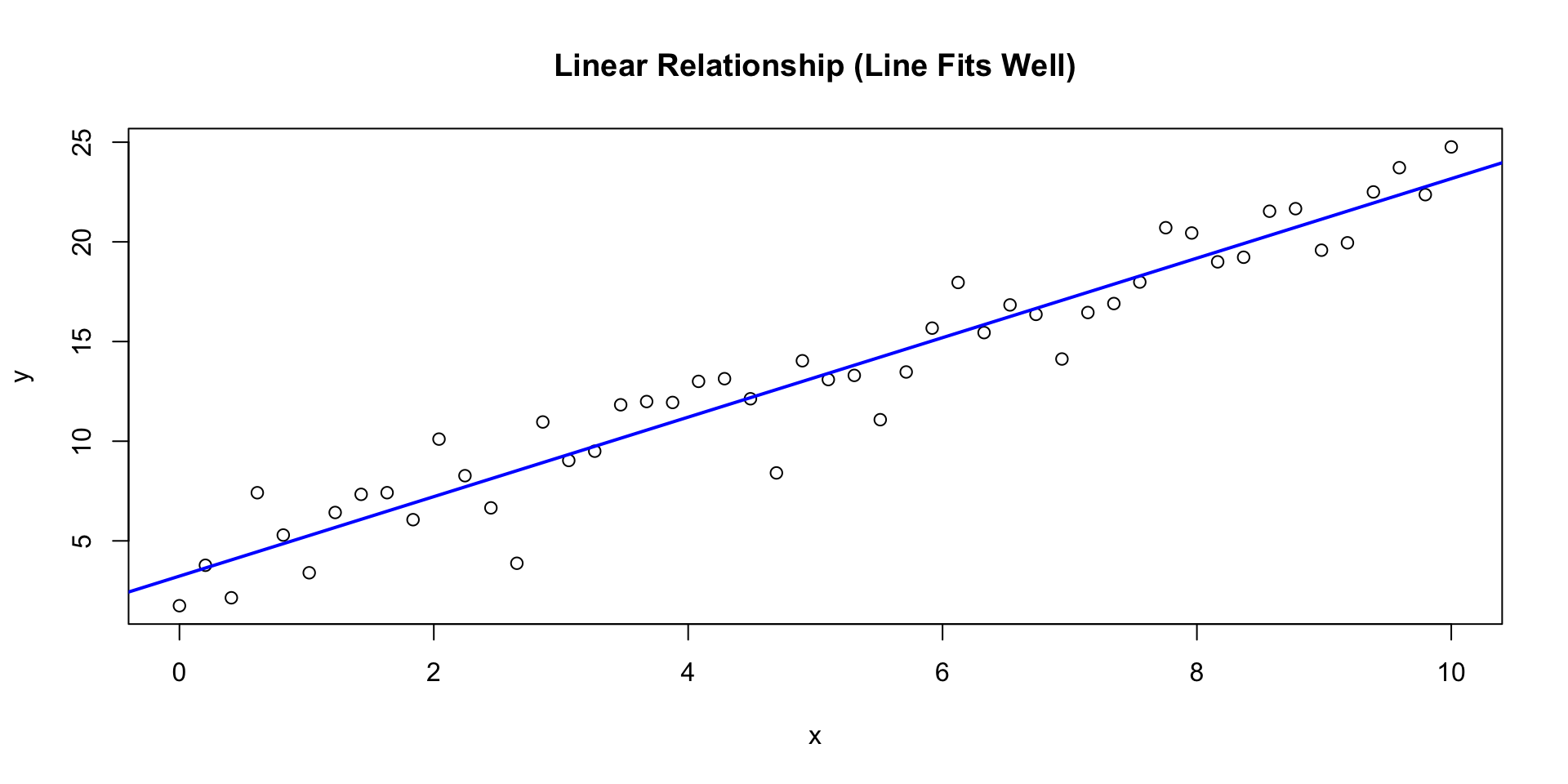
Fitting a line to a (synthetic) linear relation

Code
set.seed(1)
x <- seq(0, 10, length.out = 50)
y <- 3 + 2*x + rnorm(50, mean = 0, sd = 2)

model <- lm(y ~ x)
residuals <- resid(model)
fitted <- fitted(model)

plot(x, y,
     main = "Linear Relationship (Line Fits Well)",
     xlab = "x",
     ylab = "y")
abline(model, col = "blue", lwd = 2)

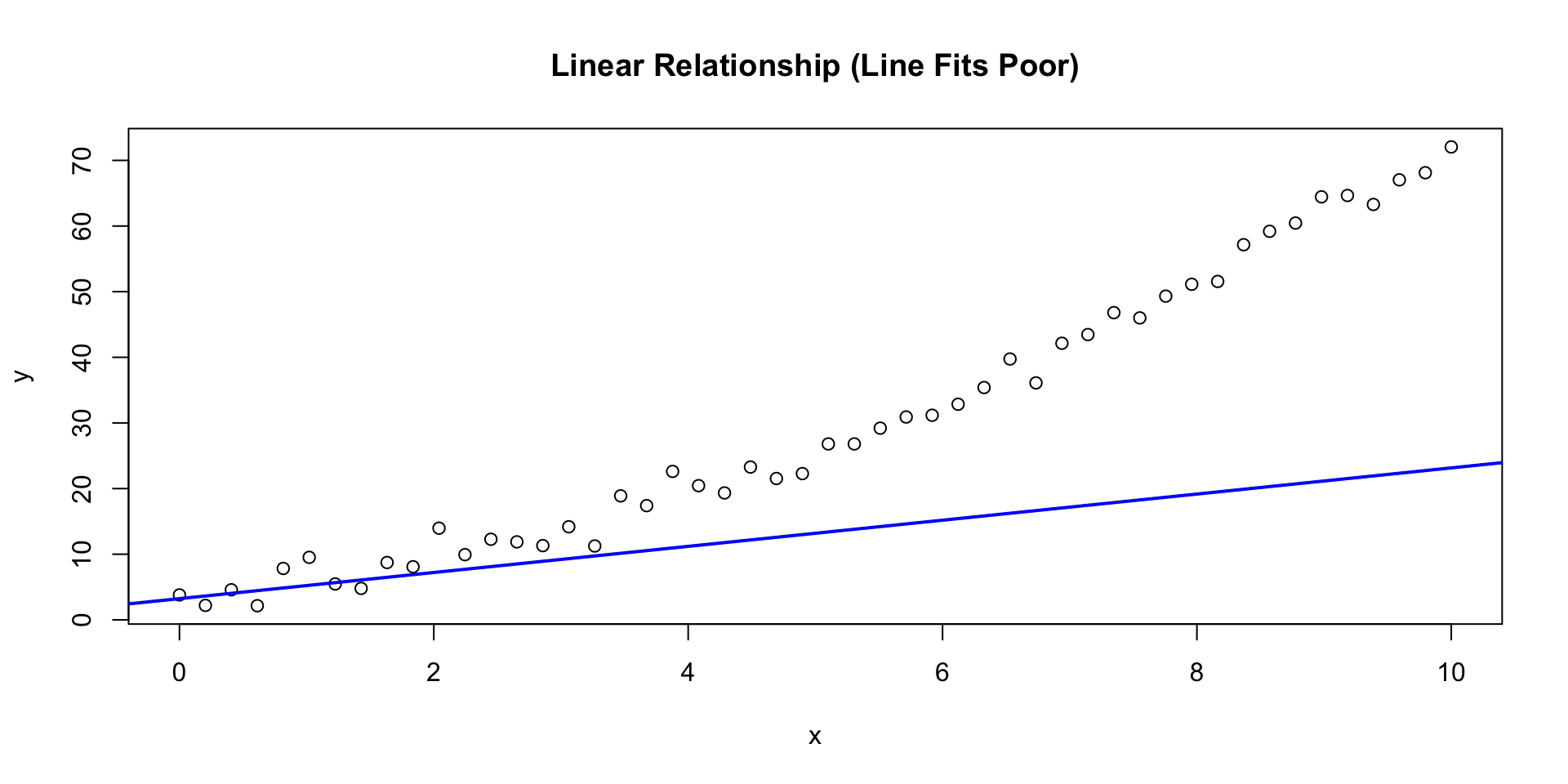
Fitting a line to a (synthetic) nonlinear relation

Code
# Add a nonlinear relationship
y_curve <- 3 + 2*x + 0.5*x^2 + rnorm(50, 0, 2)
model_curve <- lm(y_curve ~ x)

plot(x, y_curve,
     main = "Linear Relationship (Line Fits Poor)",
     xlab = "x",
     ylab = "y")
abline(model, col = "blue", lwd = 2)

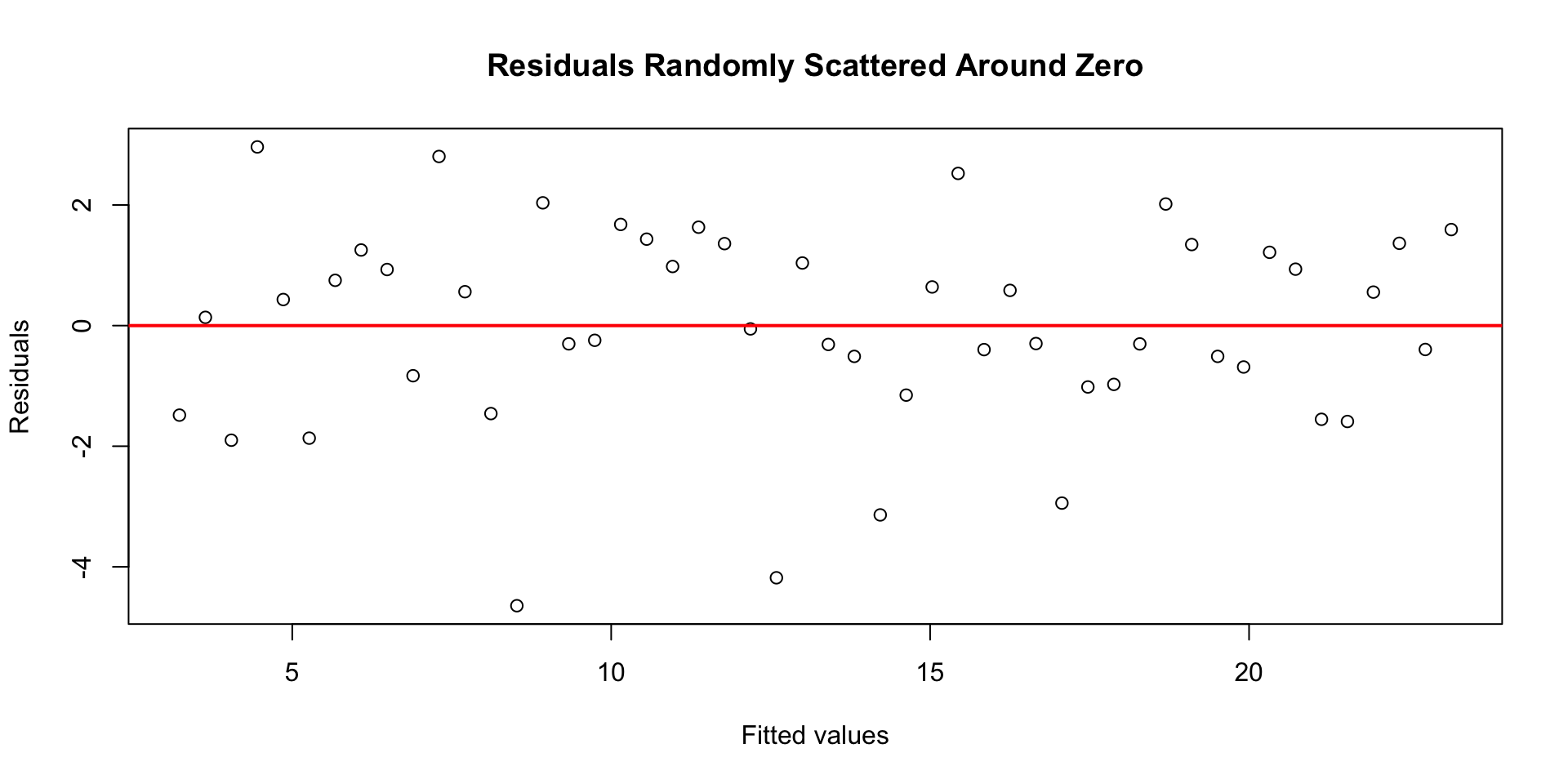
Fitting a line to a (synthetic) linear relation

Code
set.seed(1)
x <- seq(0, 10, length.out = 50)
y <- 3 + 2*x + rnorm(50, mean = 0, sd = 2)

model <- lm(y ~ x)
residuals <- resid(model)
fitted <- fitted(model)

# Residual plot
plot(fitted, residuals,
     main = "Residuals Randomly Scattered Around Zero",
     xlab = "Fitted values",
     ylab = "Residuals")
abline(h = 0, col = "red", lwd = 2)

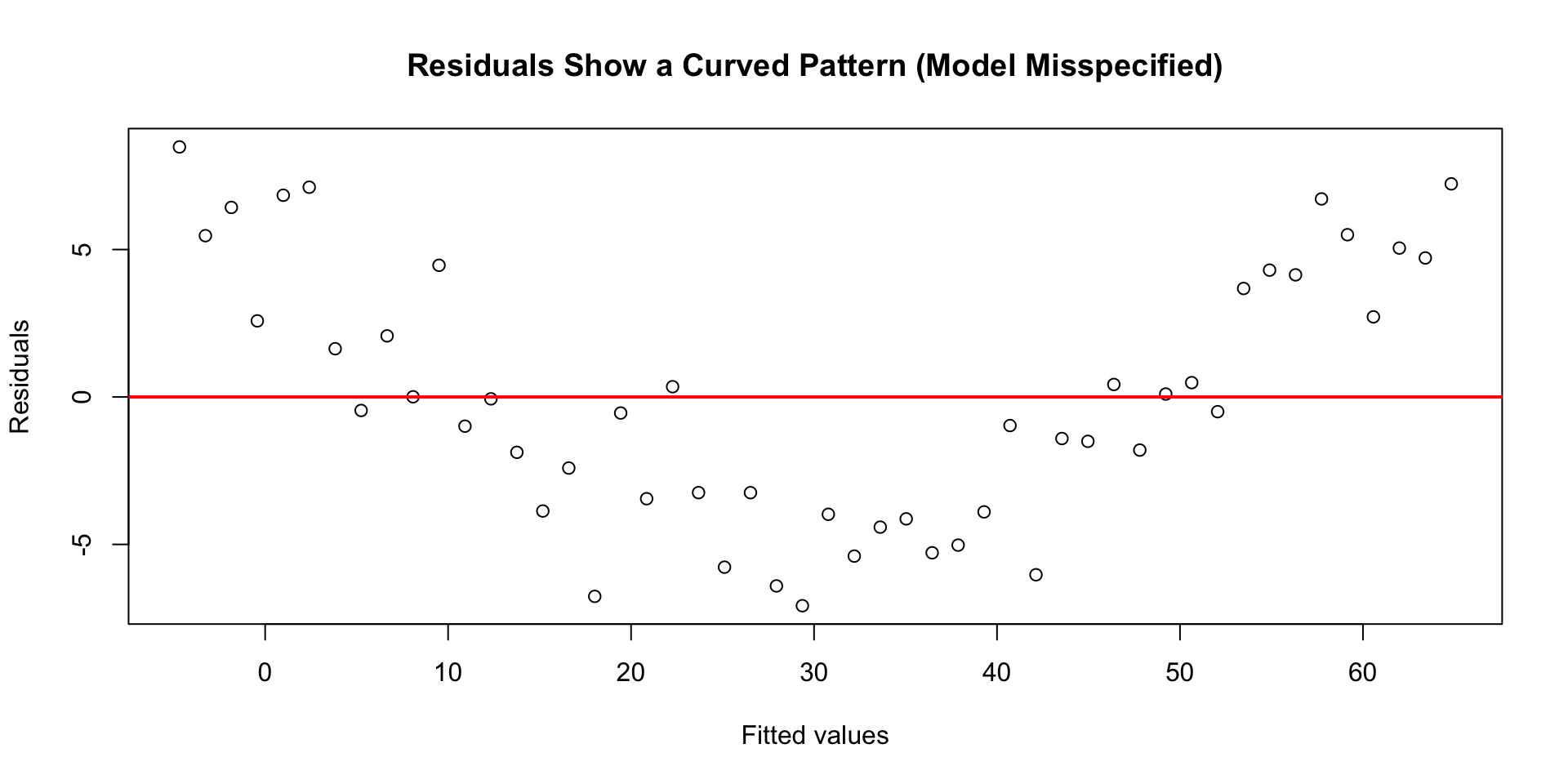
Fitting a line to a (synthetic) nonlinear relation

Code
# Add a nonlinear relationship
y_curve <- 3 + 2*x + 0.5*x^2 + rnorm(50, 0, 2)
model_curve <- lm(y_curve ~ x)

plot(fitted(model_curve), resid(model_curve),
     main = "Residuals Show a Curved Pattern (Model Misspecified)",
     xlab = "Fitted values",
     ylab = "Residuals")
abline(h = 0, col = "red", lwd = 2)

How Good Is the Model? (Penguins)


summary(penguin_model)$r.squared
[1] 0.7589925

The coefficient of determination \(R^2\) is the fraction of variance in body mass explained by flipper length.

Measuring Model Fit: \(R^2\)

The coefficient of determination \(R^2\) tells us how much variation in \(y\) is explained by the model:

\[ R^2 = 1 - \frac{SS_{res}}{SS_{tot}} \]

  • \(SS_{res} = \sum (y_i - \widehat{y}_i)^2\): unexplained variation
  • \(SS_{tot} = \sum (y_i - \bar{y})^2\): total variation

If \(R^2 = 0.8\), then 80% of the variation in body mass is explained by flipper length.

Try it out!

Answer the following questions about model fit and interpretation.

  1. A regression predicting penguin body mass from flipper length gives \(R^2 = 0.78\).
    • What does this tell us about the model’s performance?
  2. A model predicting exam scores from study hours has \(R^2 = 0.25\).
    • How strong is this relationship? What might explain the rest of the variation?
  3. A model predicting housing prices from square footage yields \(R^2 = 0.92\).
    • What does a high \(R^2\) like this suggest? Could there still be other missing factors?
  4. A model predicting customer satisfaction from advertising spending gives \(R^2 = 0.05\).
    • What can we conclude about this model’s usefulness?
  5. Two models predict penguin body mass:
    • Model A uses flipper length only (\(R^2 = 0.78\))
    • Model B uses flipper length and species (\(R^2 = 0.88\))
    • Which model explains more variation? Does that automatically make it “better”? Why or why not?
05:00

Correlation vs. Causation


A strong correlation or high \(R^2\) does not imply causation.

Possible explanations for a relationship:

  1. \(X \rightarrow Y\): Flipper length influences body mass.
  2. \(Y \rightarrow X\): Larger penguins develop longer flippers.
  3. A third factor (e.g., species, age, or sex) affects both.

Regression describes associations, not causes.

Log‑X Example with Gapminder

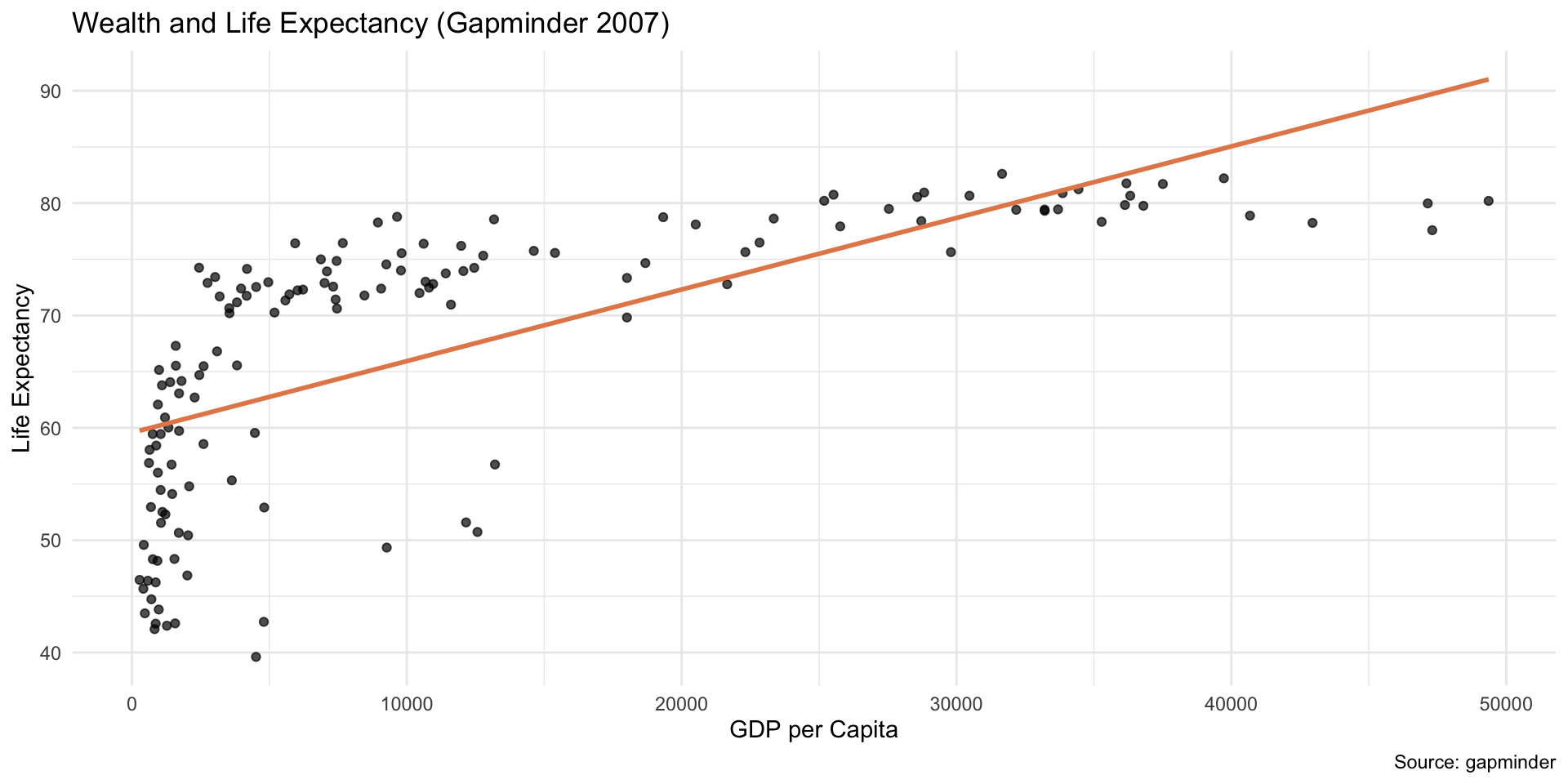
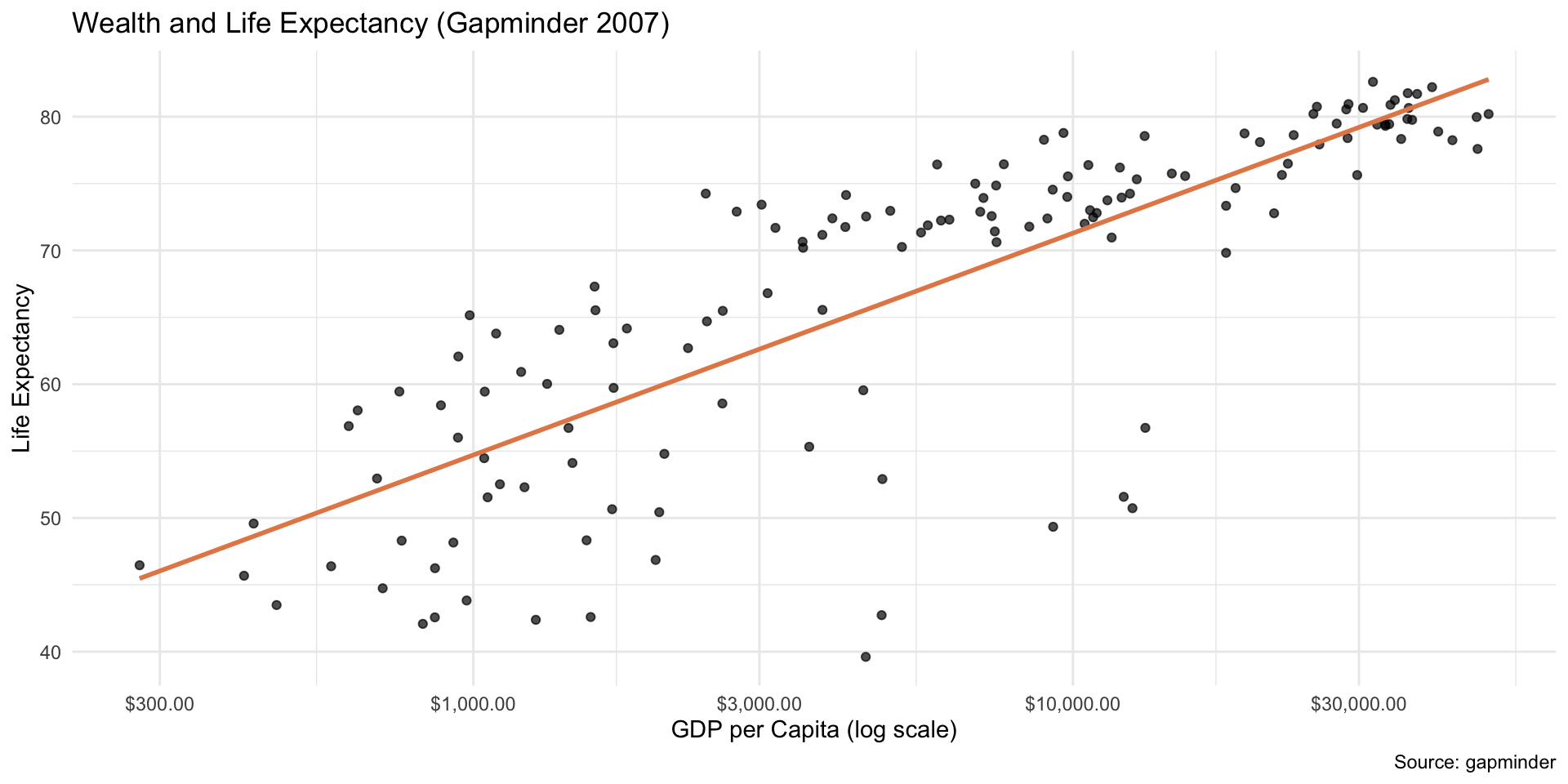
For variables spanning orders of magnitude (e.g., GDP per capita), a log transform often makes relationships more linear.

#install.packages('gapminder')
library(gapminder)

gm <- gapminder |>
  filter(year == 2007) |>
  select(country, lifeExp, gdpPercap) |>
  drop_na()

glimpse(gm)
Rows: 142
Columns: 3
$ country   <fct> "Afghanistan", "Albania", "Algeria", "Angola", "Argentina", …
$ lifeExp   <dbl> 43.828, 76.423, 72.301, 42.731, 75.320, 81.235, 79.829, 75.6…
$ gdpPercap <dbl> 974.5803, 5937.0295, 6223.3675, 4797.2313, 12779.3796, 34435…

Log‑X Example with Gapminder

Linear scale in x

Code
ggplot(gm, aes(x = gdpPercap, y = lifeExp)) +
  geom_point(alpha = 0.7) +
  geom_smooth(method = "lm", color = "#E48957", se = FALSE) +
  labs(
    title = "Wealth and Life Expectancy (Gapminder 2007)",
    x = "GDP per Capita",
    y = "Life Expectancy",
    caption = "Source: gapminder"
  ) +
  theme_minimal()

Log‑X Example with Gapminder

Log scale in x

Code
ggplot(gm, aes(x = gdpPercap, y = lifeExp)) +
  geom_point(alpha = 0.7) +
  geom_smooth(method = "lm", color = "#E48957", se = FALSE) +
  scale_x_log10(labels = scales::label_dollar()) +
  labs(
    title = "Wealth and Life Expectancy (Gapminder 2007)",
    x = "GDP per Capita (log scale)",
    y = "Life Expectancy",
    caption = "Source: gapminder"
  ) +
  theme_minimal()

Log‑X Example with Gapminder


gm_model <- lm(lifeExp ~ gdpPercap, data = gm)
summary(gm_model)$r.squared
[1] 0.4605827


# take log(x)
gm_model <- lm(lifeExp ~ log(gdpPercap), data = gm)
summary(gm_model)$r.squared
[1] 0.654449

Log‑X Example with Gapminder


When the explanatory variable is logged, interpret the slope using multipliers.
For a percent change in GDP per capita, multiply the slope by \(\log(\text{multiplier})\).
  • 10% increase: \(b_1 \times \log(1.1)\)
  • Doubling: \(b_1 \times \log(2)\)
  • Tripling: \(b_1 \times \log(3)\)

Regression vs Classification (Preview)

  • Regression: predict numeric \((Y)\) (e.g., score, income)
    • methods: linear regression, random forests, boosted trees, etc.
  • Classification: predict category \((Y)\) (e.g., spam/not)
    • methods: logistic regression, k‑NN, trees, SVM, etc.

Summary

  • Modeling helps describe relationships and predict outcomes.
  • Simple linear regression: \(\widehat{y} = b_0 + b_1 x\).
  • Interpret slope, make predictions, examine residuals and \(R^2\).
  • Keep causal claims cautious: model \(\neq\) proof of cause.