name <- c("Cars", "WALL-E", "The Lego Movie", "PAW Patrol: The Movie")
lead_person <- c("Lightning McQueen (Owen Wilson)",
                 "WALL-E (Ben Burtt)",
                 "Emmet Brickowski (Chris Pratt)",
                 "Ryder (Will Brisbin)")
length_minutes <- c(120, 97, 101, 86)
award <- c(TRUE, TRUE, TRUE, FALSE)

df <- data.frame(
  name,
  lead_person,
  length_minutes,
  award
)Intro to Tidyverse
Sarah Cassie Burnett
September 9, 2025
Annoucements
- Online quiz posted at the end of class, due tomorrow.
- Next in class quiz on Thursday.
- Coding Assignment 1 is available and due Thursday by 11:59 pm.

Scan and fill out for participation credit
A Data Science Workflow
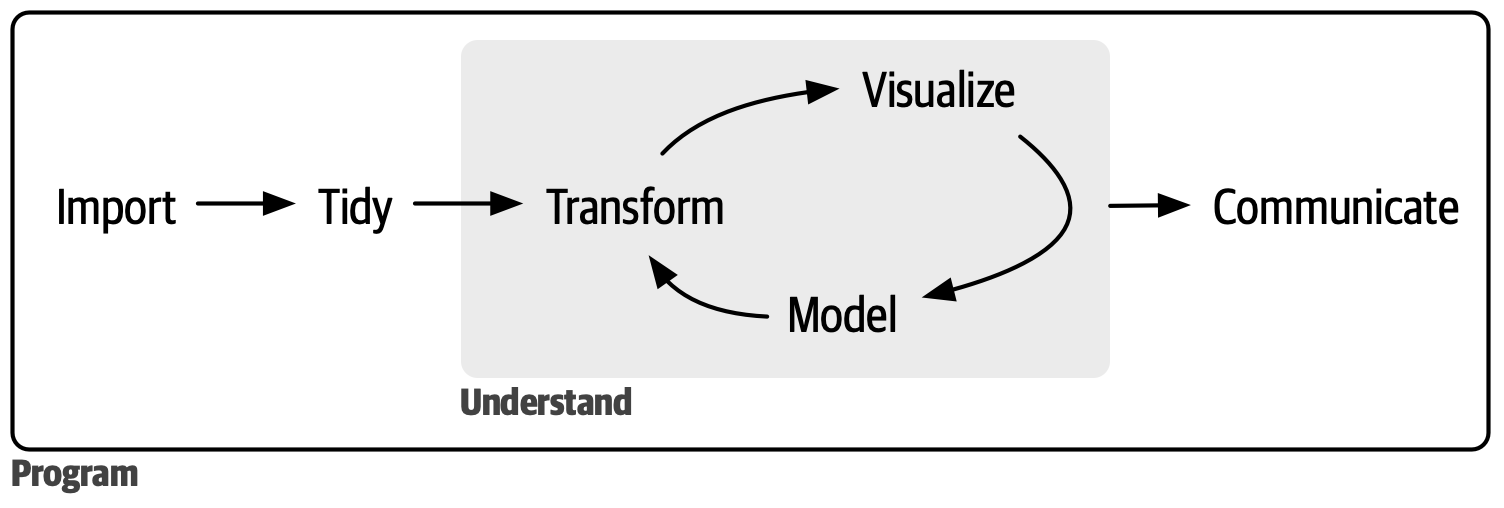
The Tidyverse
- The Tidyverse is a collection of data science packages
- It is also considered a dialect of R
- In this class, we will be using many Tidyverse packages
readrfor reading data
tidyrfor data tidyingdplyrfor data manipulationggplot2for data visualization
- Click here for a full list
Working with Tidyverse packages
- At first we will load the packages independently, e.g.
library(ggplot2) - Later we will load them all at once with
library(tidyverse) - Another way to call a package is with
::, e.g.ggplot2::ggplot()
Dataframe
What is this?
Reading Data into R
Download some data: Download the ZIP version
Let’s use the
readrpackage to read in a dataset
Let’s Look at the Data
One way to do this is with the base R head() function
# A tibble: 6 × 9
   Year Length Title    Genre `Lead Man` `Lead Woman` Director Popularity Awards
  <dbl>  <dbl> <chr>    <chr> <chr>      <chr>        <chr>         <dbl> <lgl>
1  1990    111 Tie Me … Come… Banderas,… Abril, Vict… Almodóv…         68 FALSE
2  1991    113 High He… Come… Bosé, Mig… Abril, Vict… Almodóv…         68 FALSE
3  1983    104 Dead Zo… Horr… Walken, C… Adams, Broo… Cronenb…         79 FALSE
4  1979    122 Cuba     Acti… Connery, … Adams, Broo… Lester,…          6 FALSE
5  1978     94 Days of… Drama Gere, Ric… Adams, Broo… Malick,…         14 FALSE
6  1983    140 Octopus… Acti… Moore, Ro… Adams, Maud  Glen, J…         68 FALSE
Use View()
Another way to look at the data is with View(). Or click on the name of the data frame in the Environment pane.
Using glimpse() from dplyr
Another way to look at the data is with glimpse() from the dplyr package.
Rows: 1,659
Columns: 9
$ Year         <dbl> 1990, 1991, 1983, 1979, 1978, 1983, 1984, 1989, 1985, 199…
$ Length       <dbl> 111, 113, 104, 122, 94, 140, 101, 99, 104, 149, 188, 117,…
$ Title        <chr> "Tie Me Up! Tie Me Down!", "High Heels", "Dead Zone, The"…
$ Genre        <chr> "Comedy", "Comedy", "Horror", "Action", "Drama", "Action"…
$ `Lead Man`   <chr> "Banderas, Antonio", "Bosé, Miguel", "Walken, Christopher…
$ `Lead Woman` <chr> "Abril, Victoria", "Abril, Victoria", "Adams, Brooke", "A…
$ Director     <chr> "Almodóvar, Pedro", "Almodóvar, Pedro", "Cronenberg, Davi…
$ Popularity   <dbl> 68, 68, 79, 6, 14, 68, 14, 28, 6, 32, 81, 17, 46, 49, 6, …
$ Awards       <lgl> FALSE, FALSE, FALSE, FALSE, FALSE, FALSE, FALSE, FALSE, F…
Try it out!
- Read in the
film_cleanish.csvfile - Use the three methods we discussed to view the data
05:00
A Few More Basic dplyr Functions
Use select() to choose columns.
A Few More Basic dplyr Functions
Use filter() to choose rows.
Note
Using the same name for the data frame results in overwriting the original data frame. If you want to keep the original data frame, use a different name.
A Few More Basic dplyr Functions
Use mutate() to create new columns.
Rows: 1,659
Columns: 10
$ Year         <dbl> 1990, 1991, 1983, 1979, 1978, 1983, 1984, 1989, 1985, 199…
$ Length       <dbl> 111, 113, 104, 122, 94, 140, 101, 99, 104, 149, 188, 117,…
$ Title        <chr> "Tie Me Up! Tie Me Down!", "High Heels", "Dead Zone, The"…
$ Genre        <chr> "Comedy", "Comedy", "Horror", "Action", "Drama", "Action"…
$ `Lead Man`   <chr> "Banderas, Antonio", "Bosé, Miguel", "Walken, Christopher…
$ `Lead Woman` <chr> "Abril, Victoria", "Abril, Victoria", "Adams, Brooke", "A…
$ Director     <chr> "Almodóvar, Pedro", "Almodóvar, Pedro", "Cronenberg, Davi…
$ Popularity   <dbl> 68, 68, 79, 6, 14, 68, 14, 28, 6, 32, 81, 17, 46, 49, 6, …
$ Awards       <lgl> FALSE, FALSE, FALSE, FALSE, FALSE, FALSE, FALSE, FALSE, F…
$ Length_hours <dbl> 1.850000, 1.883333, 1.733333, 2.033333, 1.566667, 2.33333…
Try it out!
- Use your new
dplyrverbs to manipulate the data - Select columns, filter rows, and create new columns
05:00
Basic Data Viz with ggplot2
ggplot2is a powerful data visualization package- It is based on the grammar of graphics
- We will talk about this more in depth later
Basic Data Viz with ggplot2
- For now, let’s make a simple column chart
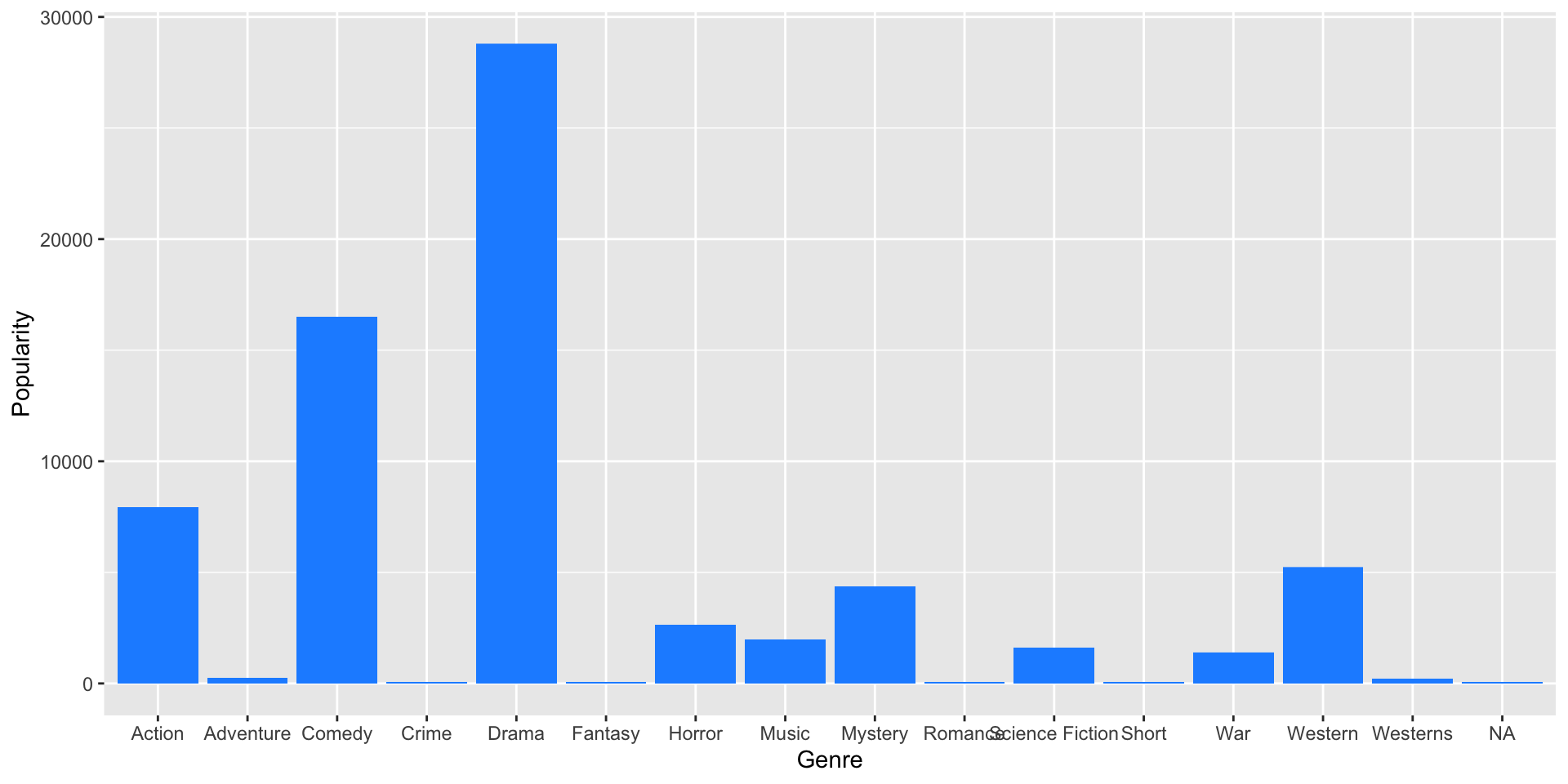
Try it out!
- Use
ggplot2to make a simple column chart - Choose a different variable to plot
- Change the color of the bars
05:00