Advanced Data Visualization Techniques

Sarah Cassie Burnett

September 16, 2025

Announcements

  • Online quiz posted at the end of class, due tomorrow.
  • Coding Assignment 1 is due by 11:59 pm tonight.
    • Submit the assignment on Gradescope.
  • Minor final project assignment due Thursday.

Scan and fill out for participation credit

https://forms.gle/aZZUC2enjyzE2LrN9

Last class

  • Column charts (bar charts)
    • Use to compare values across categories
  • Histograms
    • Use to show distribution of a single variable
  • Line charts
    • Use to show trends over time
    • Can use column charts but not as effective
  • Scatter plots
    • Use to show relationships between two variables
    • X-axis is usually explanatory variable, Y-axis is outcome variable

Other Plots and Geometries


  • Box Plot
    geom_boxplot()

  • Violin Plot
    geom_violin()

  • Density Plot
    geom_density()

  • Bar Plot (Categorical)
    geom_bar()

  • Heatmap
    geom_tile()

  • Area Plot
    geom_area()

  • Dot Plot
    geom_dotplot()

  • Pie Chart
    (usually a bar plot with coord_polar())

  • Ridgeline Plot
    ggridges::geom_density_ridges()

  • Map Plot (Choropleth)
    geom_polygon()

The Grammar of Graphics

  • Data viz has a language with its own grammar
  • Basic components include:
    • Data we are trying to visualize
    • Aesthetics (dimensions)
    • Geom (e.g. bar, line, scatter plot)
    • Color scales
    • Themes
    • Annotations

Resources


  • Have a look at the documentation for ggplot2
  • Familiarize yourself with the ggplot2 cheatsheet

Fill vs. Color


  • Use color (e.g. color = or scale_color_*) to modify the color of points, lines, or text.
  • Commonly applied to:
    • Scatter plots
    • Line charts
    • Text elements

Fill vs. Color


  • Use fill (e.g. fill = or scale_fill_*) to modify the fill color of shapes like bars, boxes, or polygons.
  • Commonly applied to:
    • Bar charts
    • Box plots
    • Histograms

Load & Clean Film Data

library(readr)
films <- read_csv("data/film_cleanish.csv")

# filter out the NA in Length
library(tidyr)
films <- films |> drop_na(Length)

# filter out the NA in Genre
library(dplyr)
films <- films |>
  filter(!is.na(Genre))

films_w_awards <- films |>
  filter(Awards)

Histogram: Award-Winning Movie Lengths (by Genre)
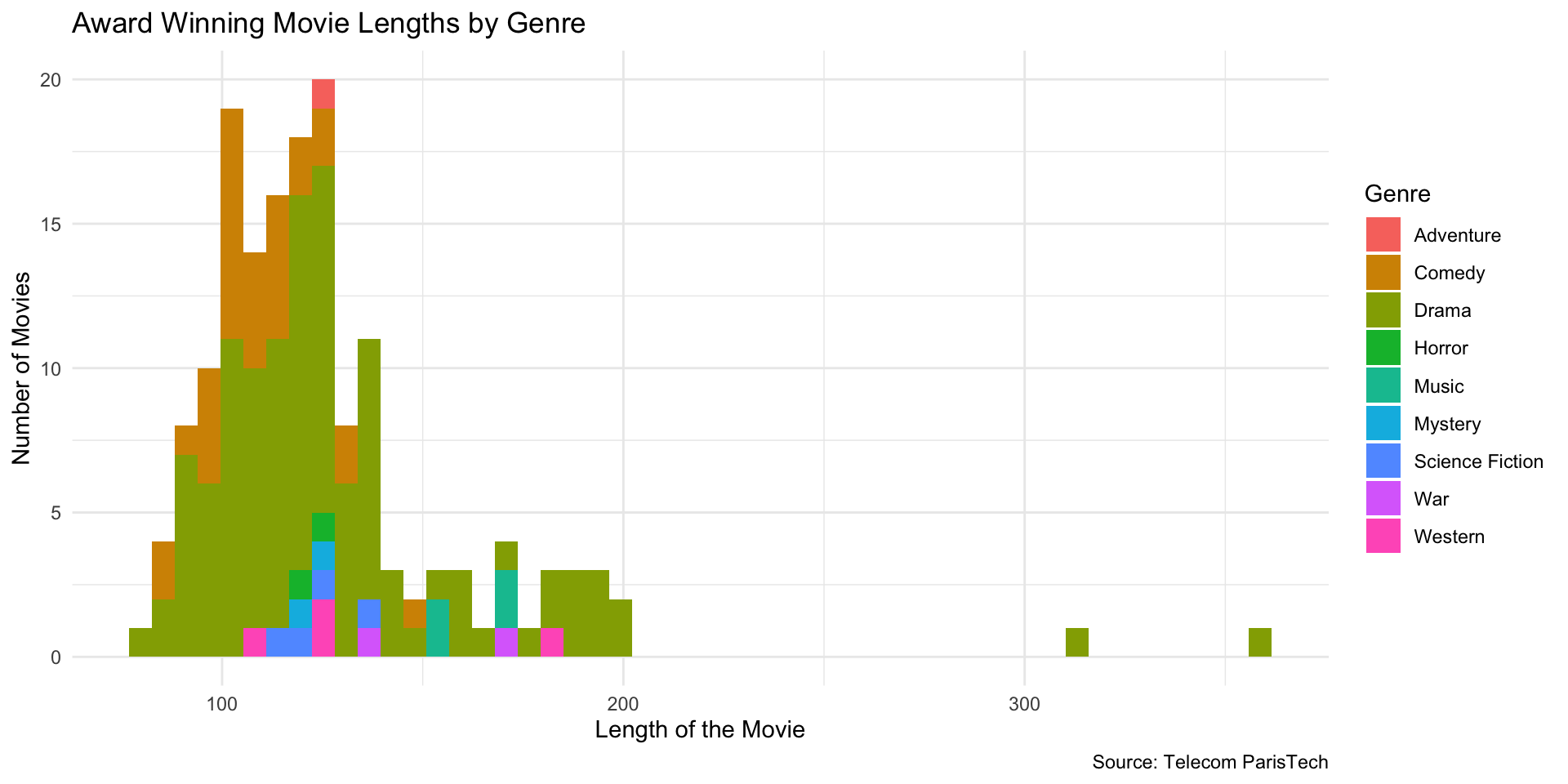
Histogram: Award-Winning Movie Lengths

library(ggplot2)

ggplot(films_w_awards, aes(x = Length, fill = Genre)) +
  geom_histogram(bins = 50) +
  labs(
    x = "Length of the Movie",
    y = "Number of Movies",
    title = "Award Winning Movie Lengths by Genre",
    caption = "Source: Telecom ParisTech"
  ) +
  theme_minimal()

Overlay Two Groups

(Drama vs Not Drama)
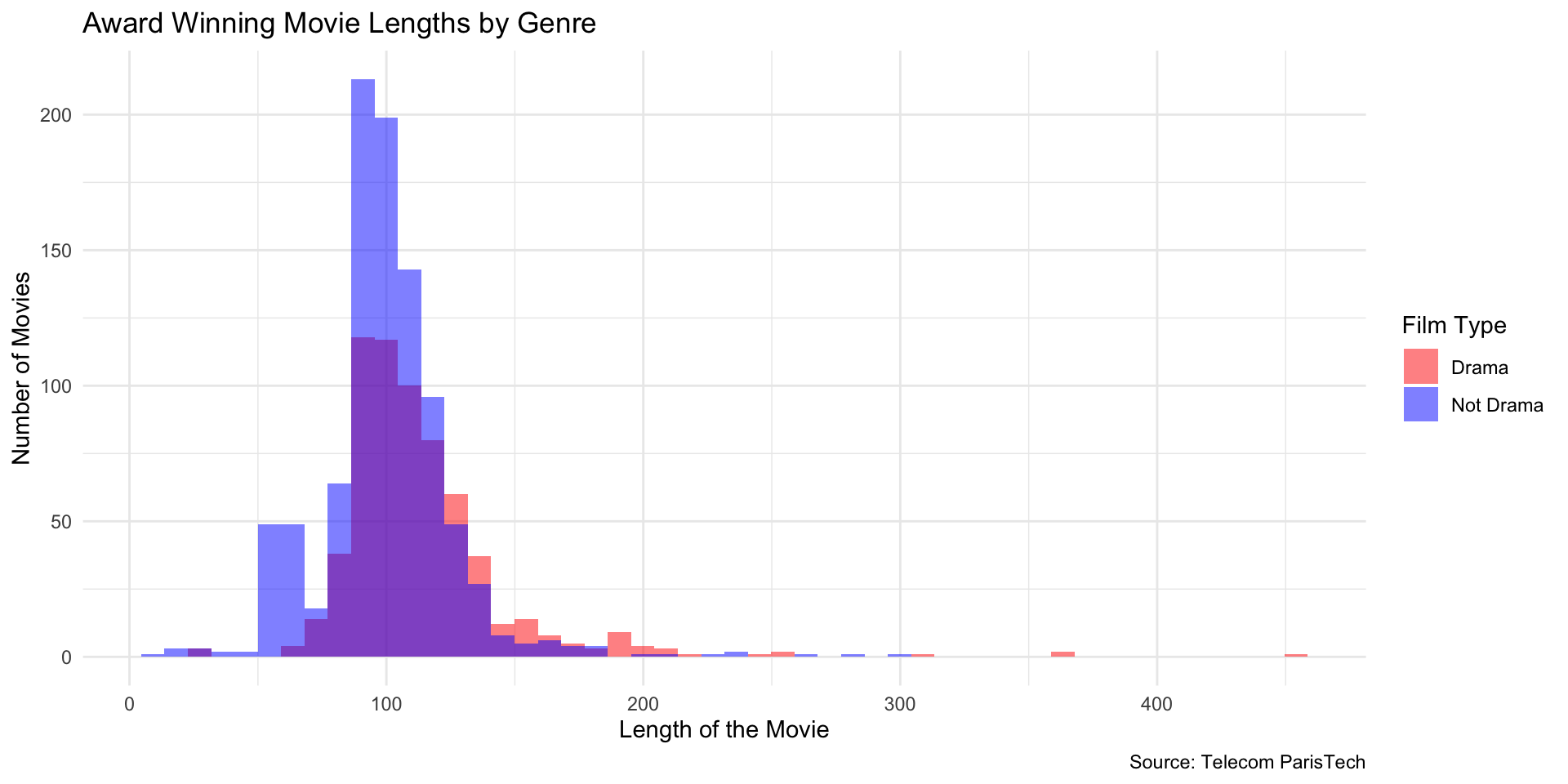
Overlay Two Groups (Drama vs Not Drama)

drama_films <- films |> filter(Genre == "Drama")
not_drama_films <- films |> filter(Genre != "Drama")

ggplot() +
  geom_histogram(data = drama_films, aes(x = Length, fill = "Drama"),
                 alpha = 0.5, bins = 50) +
  geom_histogram(data = not_drama_films, aes(x = Length, fill = "Not Drama"),
                 alpha = 0.5, bins = 50) +
  labs(
    x = "Length of the Movie",
    y = "Number of Movies",
    title = "Award Winning Movie Lengths by Genre",
    caption = "Source: Telecom ParisTech",
    fill = "Film Type"
  ) +
  theme_minimal()

Manually add the scale values.

drama_films <- films |> filter(Genre == "Drama")
not_drama_films <- films |> filter(Genre != "Drama")

ggplot() +
  geom_histogram(data = drama_films, aes(x = Length, fill = "Drama"),
                 alpha = 0.5, bins = 50) +
  geom_histogram(data = not_drama_films, aes(x = Length, fill = "Not Drama"),
                 alpha = 0.5, bins = 50) +
  scale_fill_manual(values = c("Drama" = "red", "Not Drama" = "blue")) +
  labs(
    x = "Length of the Movie",
    y = "Number of Movies",
    title = "Award Winning Movie Lengths by Genre",
    caption = "Source: Telecom ParisTech",
    fill = "Film Type"
  ) +
  theme_minimal()

Use mutate to instead create a new column of data with this information
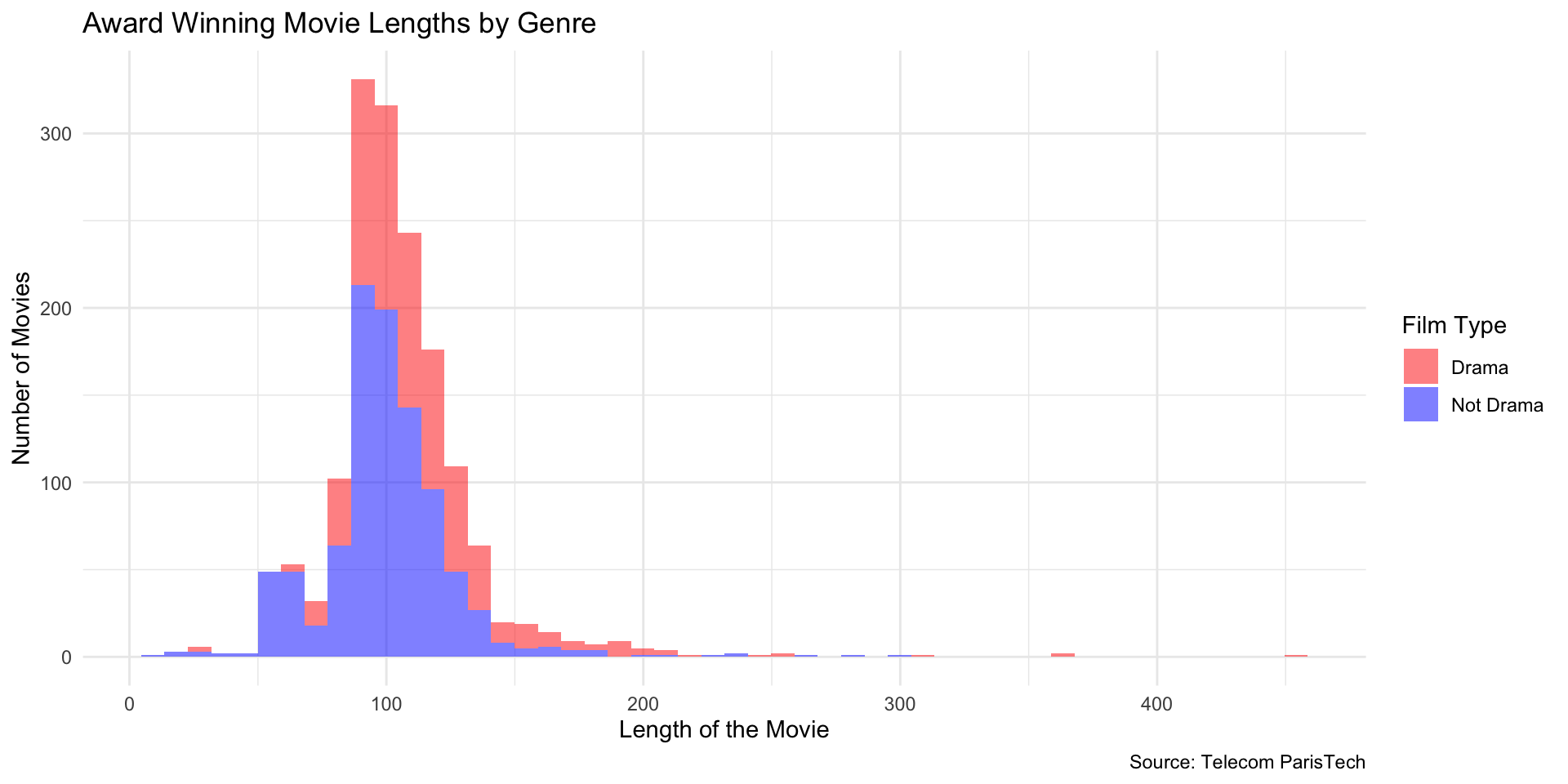
Use mutate to instead create a new column of data with this information

films2 <- films |>
  mutate(GenreType = if_else(Genre == "Drama", "Drama", "Not Drama"))

ggplot(films2, aes(x = Length, fill = GenreType)) +
  geom_histogram(bins = 50, alpha = 0.5) +
  scale_fill_manual(values = c("Drama" = "red", "Not Drama" = "blue")) +
  labs(
    x = "Length of the Movie",
    y = "Number of Movies",
    title = "Award Winning Movie Lengths by Genre",
    caption = "Source: Telecom ParisTech",
    fill = "Film Type"
  ) +
  theme_minimal()

Faceted Histogram (Drama vs Not Drama)
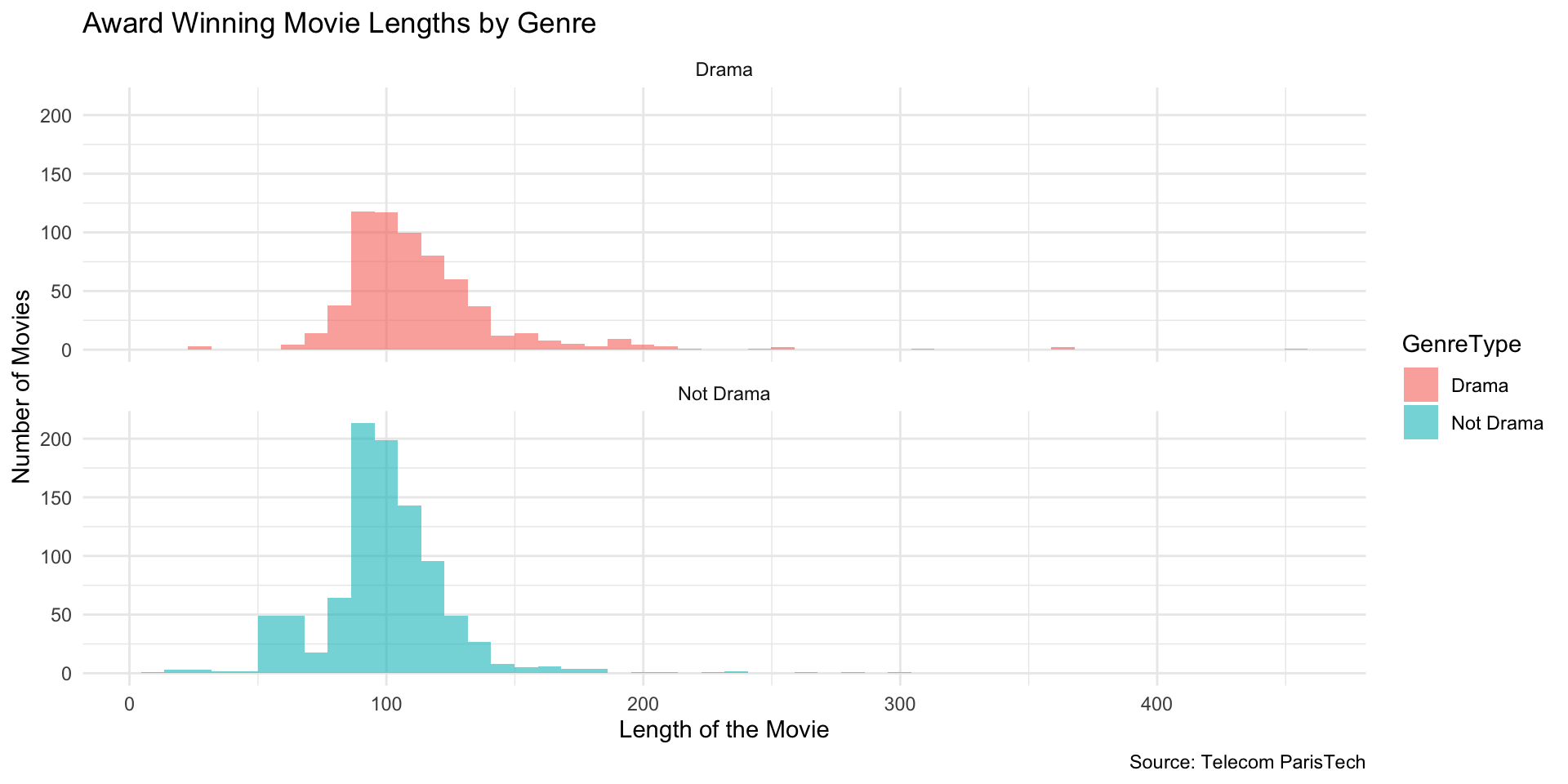
Faceted Histogram (Drama vs Not Drama)

p <- ggplot(films2, aes(x = Length, fill = GenreType)) +
  geom_histogram(alpha = 0.6, bins = 50) +
  facet_wrap(~ GenreType, ncol = 1) +
  labs(
    x = "Length of the Movie",
    y = "Number of Movies",
    title = "Award Winning Movie Lengths by Genre",
    caption = "Source: Telecom ParisTech"
  ) +
  theme_minimal()

p

Save Plots (PNG / PDF / RDS)


# Save as PNG and PDF
ggsave("myplot.png", plot = p, width = 6, height = 4, dpi = 300)
ggsave("myplot.pdf", plot = p, width = 6, height = 4)

# Save & reload plot object
saveRDS(p, file = "myplot.rds")
p2 <- readRDS("myplot.rds")
p2

Diamonds: Range Check


# Built-in dataset
min(diamonds$price)
[1] 326
max(diamonds$price)
[1] 18823
max(diamonds$price)/min(diamonds$price) 
[1] 57.73926

Over 50x difference

Diamonds: Linear Histogram (Counts)


diamond_plot <- ggplot(diamonds, aes(x = price)) +
  geom_histogram(bins = 100, fill = "hotpink4") +
  labs(
    title = "Distribution of Diamond Prices (Linear)",
    x = "Price",
    y = "Count"
  ) +
  theme_minimal()

diamond_plot

Diamonds: Log Scale on X (Counts)

diamond_plot + 
  scale_x_log10() + 
  labs(
    title = "Distribution of Diamond Prices (Log Scale)",
    x = "Price (log scale)",
    y = "Count"
  )

Note

Linear bins vs. Log bins
- Linear: equal dollars per bin (e.g., 0–300, 300–600, 600–900, …)
- Log10: equal factors per bin (e.g., 10^2 – 10^2.1, 10^2.1 – 10^2.2, …) or (about 100 – 126, …, 10000 – 12600)

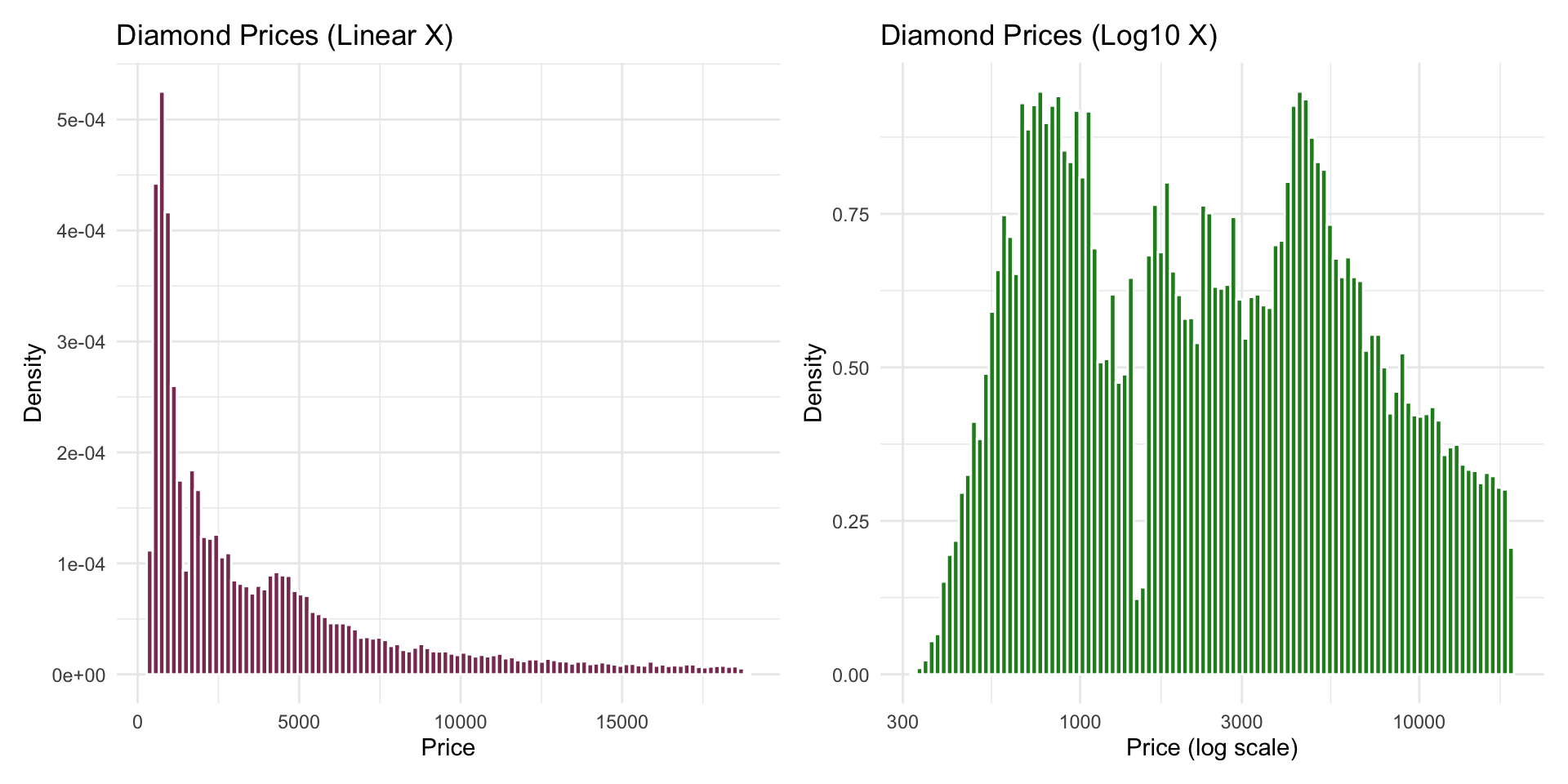
Density Comparison: Linear vs Log (Side-by-Side)

library(patchwork)

d_linear <- ggplot(diamonds, aes(x = price, y = after_stat(density))) +
  geom_histogram(bins = 100, fill = "hotpink4", color = "white") +
  labs(
    title = "Diamond Prices (Linear X)",
    x = "Price",
    y = "Density"
  ) +
  theme_minimal()

d_log <- ggplot(diamonds, aes(x = price, y = after_stat(density))) +
  geom_histogram(bins = 100, fill = "forestgreen", color = "white") +
  scale_x_log10() +
  labs(
    title = "Diamond Prices (Log10 X)",
    x = "Price (log scale)",
    y = "Density"
  ) +
  theme_minimal()

d_linear + d_log
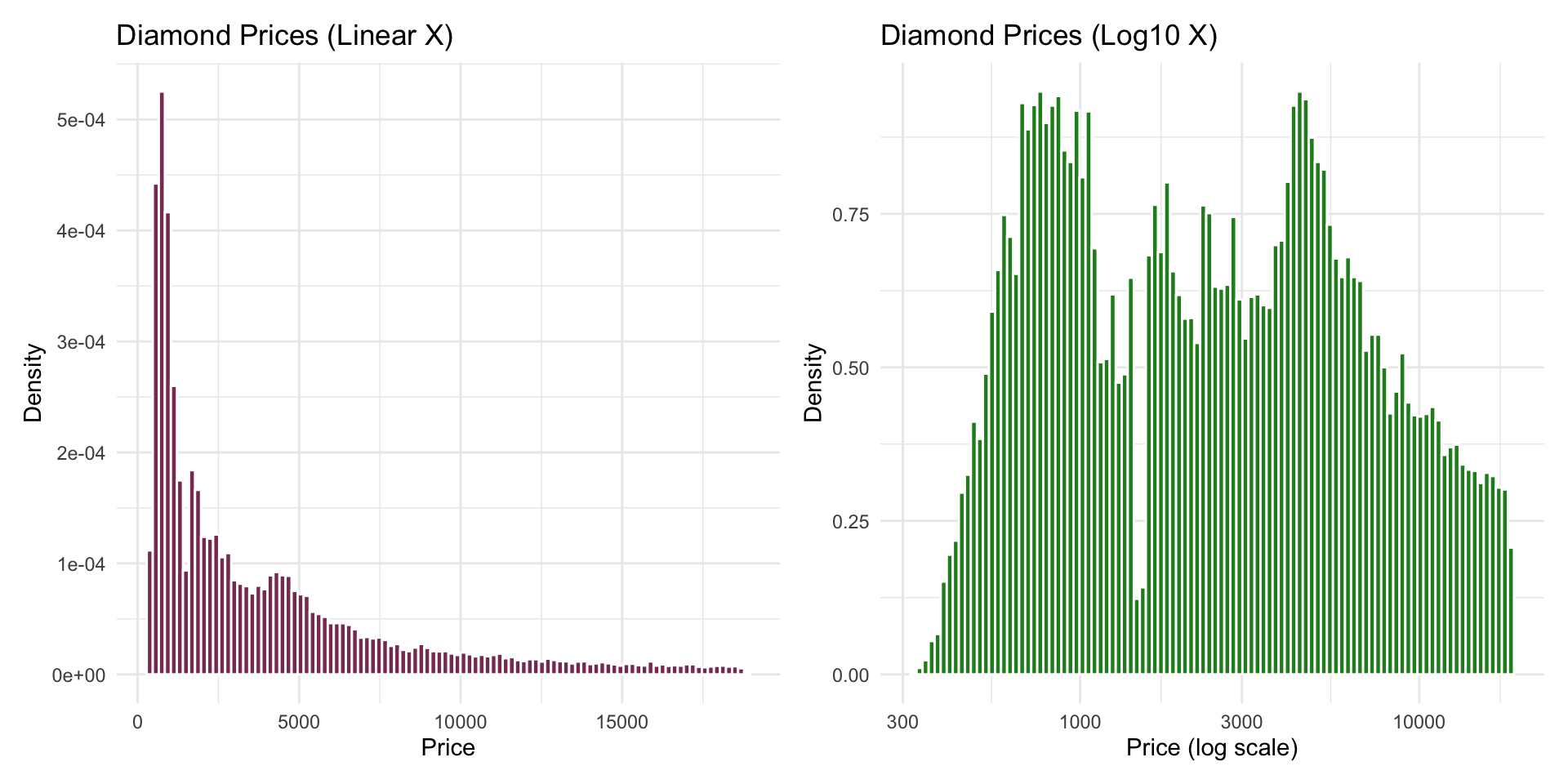
Density Comparison: Linear vs Log (Side-by-Side)
Color Scales: Viridis (Discrete)
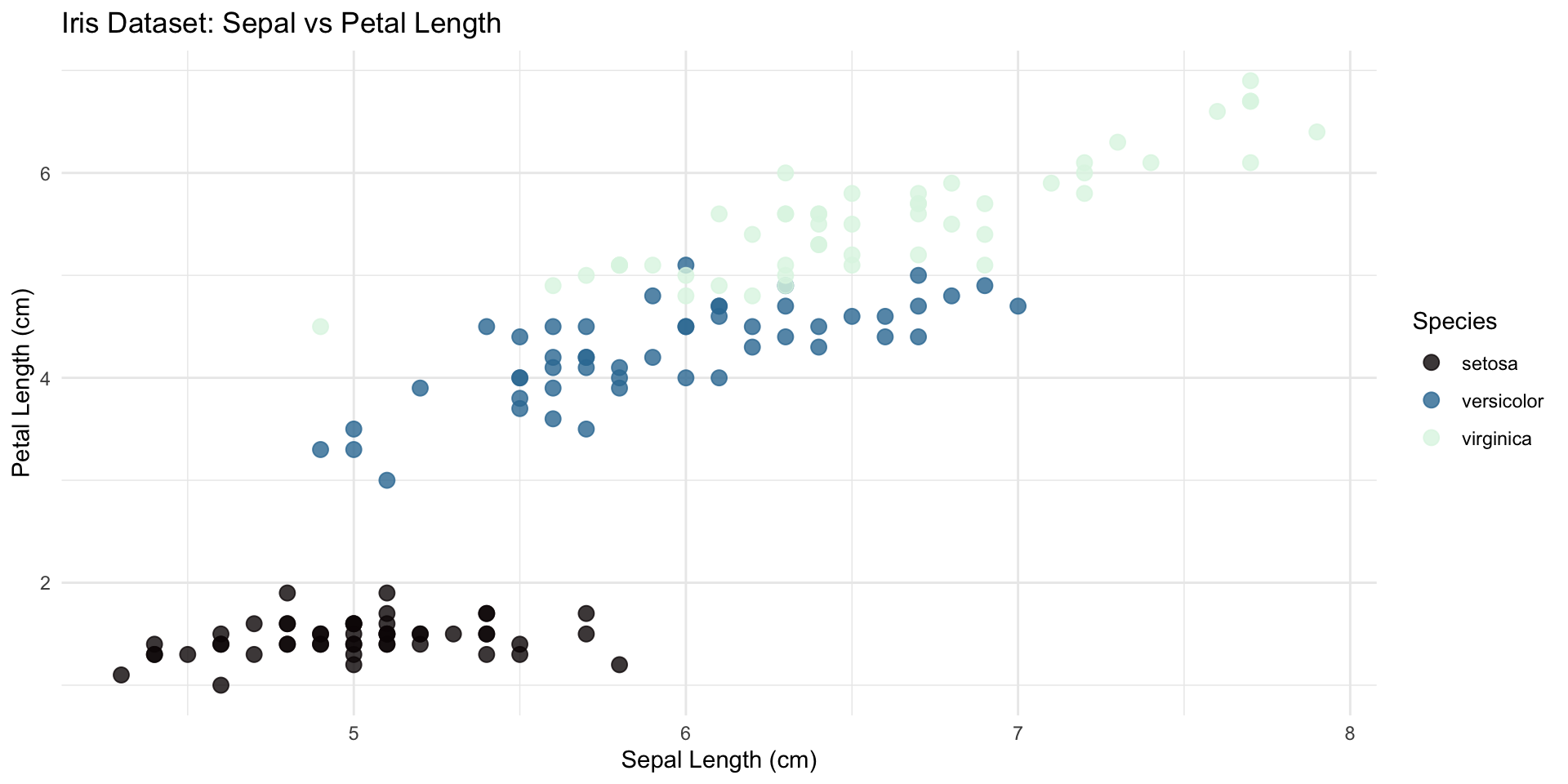
ggplot(iris, aes(x = Sepal.Length, y = Petal.Length, color = Species)) +
  geom_point(size = 3, alpha = 0.8) +
  scale_color_viridis_d(option = "mako") +
  labs(
    title = "Iris Dataset: Sepal vs Petal Length",
    x = "Sepal Length (cm)",
    y = "Petal Length (cm)",
    color = "Species"
  ) +
  theme_minimal()

Resources

Find Your Own Data


  • Visit kaggle.com
  • Find a dataset you like
  • Download it as a CSV
  • Read it into R
  • Explore with glimpse() and View()
05:00